Commands
Every slash command provided by LW Alliance Helper, grouped by feature. Most commands require the configured leadership role and the leadership channel; /setup also accepts anyone with server Administrator permission. Start with /setup if the bot hasn't been configured yet. 💎 marks Premium-only features (unlock with /upgrade).
🗂️ Your alliance's data lives in your own Google Sheet. See Where Your Data Lives for details.
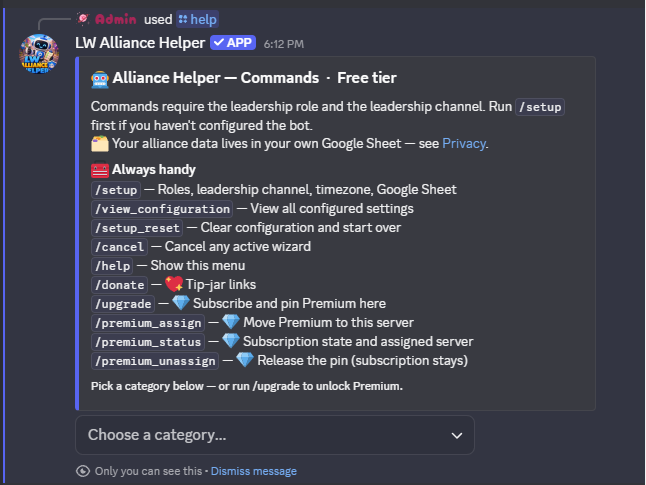
/help.⚙️ Setup Hub
One command opens the whole configuration surface. /setup shows your alliance's current configuration plus a button for every feature wizard: Core Setup, Events, Train, Birthdays, Desert Storm, Canyon Storm, Survey, Growth, Shiny Tasks, Alliance Duel (VS), and (💎 Premium) Member Sync. Three more buttons handle housekeeping: "View Configuration" prints every wizard's saved answers in one place, "📢 Release announcements: ON / OFF" toggles the leadership-channel embed the bot posts on each new major or minor release (on by default), and "Reset" clears your server's configuration so you can start over.
/setup: Open the setup hub. First-time use walks Core Setup (member role, leadership role, leadership channel, timezone, Google Sheet). After that, the hub lets you pick any feature to add, edit, or disable.
📣 Event Announcements
Schedule recurring events (Plague Marauder, Zombie Siege, or anything else) and post drafts to leadership for approval before announcing. A 5-minute warning fires automatically before kick-off. Open /events to see every action in one place.
/setup→ "📣 Events": Configure the four shared event settings: leadership draft channel, public announcement channel, daily draft time, and the 5-minute warning toggle./events: Event hub. Opens an embed showing the alliance's current event config plus a button grid for every action.- Read row: "📅 Today's events" opens the draft editor for the next event day. "📆 Upcoming events" shows configured event types plus their next firing dates. "📜 Event log" shows recent approved event posts (free tier: 7 days; 💎 Premium: 30 days).
- Write row: "➕ Create an event" opens a two-path wizard: pick from a curated preset list (Alliance Exercise variants, Zombie Siege, Glacieradon, Sky Predator) for a quick prefill, or define your own from scratch. "⏸️ Pause or resume" stops an event for a season and turns it back on later with every setting intact — when you resume a recurring event it offers a fresh anchor date, since the in-game cycle often shifts over a break. "🗑️ Delete an event" removes an event permanently.
🚂 Train Schedule
One command runs the whole train surface. /train opens a hub showing your alliance's train configuration plus a button grid. The hub adapts to whether you have turned on Conductor Rotation (an opt-in feature that drafts a fair conductor for each day automatically).
/setup→ "🚂 Train": Configure the train tab, blurb prompts, reminders, the 💎 Premium DM-to-assignee body (with{name}placeholder), and (optionally) Conductor Rotation. Free rotation points at any roster tab and name column; role-scoped days are 💎 Premium./train: Train hub. Opens an embed with your current train config plus a button grid that changes with whether Conductor Rotation is on.- With Conductor Rotation on: "📋 This week's draft" opens the weekly draft (◀ / ▶ week navigation, per-day reassignment, skip, and regenerate), "📊 Assignment logs" shows fairness counts and recent drives, "📅 Schedule presets" manages your rotation patterns, "👤 Member rules" sets per-member skips and per-day role rules, and "⚙️ Open setup" jumps into the train wizard.
- In classic mode (rotation off): "📋 Schedule overview" opens the schedule with "Add", "Update", "Generate Prompt", and "Clear" buttons, "📜 Prompt log" shows recent blurb prompts (free tier: 7 days; 💎 Premium: 30 days), "🎂 Run birthday check" adds upcoming birthdays to the schedule on demand, and "⚙️ Open setup" jumps into the wizard.
🔁 Conductor Rotation (opt-in). Turn it on from train setup and the bot drafts each day's conductor fairly: members who have driven fewest come first, ties broken by who drove longest ago, then a stable daily random pick. It draws from a roster tab you point it at, just a name column, with no Discord IDs needed on the free tier. Per-member rules skip someone for a stretch. 💎 Per-day role-scoped rules (Leadership, VS, Contest, or Event days that rotate only a Discord role's members) are Premium; on the free tier every day rotates the full roster, and a lapsed subscription falls back to that rather than leaving role days unassigned. A weekly draft posts for leadership to review and adjust, and a daily confirmation posts before the conductor goes public. Fairness counts your whole Train History sheet, so back-filling past drives is just adding rows.
🎂 Birthdays
Read birthday data from your Google Sheet. The bot can post announcements in Discord and auto-add members to the train schedule on their birthday.
/setup→ "🎂 Birthdays": Configure birthday tracking, train integration, Discord announcements, and the 💎 Premium per-member DM body (with{name}placeholder)./birthdays: Show upcoming birthdays inside your lookahead window (default 14 days).
🤝 Profession Buddy System
Pair your War Leaders with Engineers so every War Leader knows who repairs for them and every Engineer knows who to follow. Members look up their buddy any time. 💎 Premium adds automatic pairing, one-click re-pairing, self-service profession buttons, and buddy-change DMs. Open /buddy for the hub.
/setup→ "🤝 Buddy System": Configure the buddy sheet tab, whether one War Leader can take two Engineers, how to break ties when Engineers are scarce, an optional reliability ranking, a leadership alerts channel, and (💎 Premium) buddy-change DMs./buddy: Buddy hub. Opens an embed with your current pairings plus a button grid:- Anyone: "🔍 Who's my buddy?" shows your own pairing; "📋 View buddy list" shows every War Leader ↔ Engineer pairing.
- Leadership: "✏️ Manage pairings" edits pairs by hand, "🔄 Refresh from sheet" re-reads your sheet and applies hand edits, "📤 Post buddy list" posts the list to the channel, and "⚙️ Open setup" jumps into the wizard.
- 💎 Premium: "🪄 Auto-assign" pairs everyone automatically (pairing your strongest War Leaders with your most reliable Engineers when you keep a reliability score), "♻️ Re-pair from scratch" wipes and rebuilds every pairing, and "📌 Post self-service buttons" drops one-click profession buttons members use to update their own role.
⚔️ Desert Storm
One command opens the whole Desert Storm workspace. /desertstorm shows your alliance's current storm configuration plus a button grid for every action your officers need each week. Setup includes an optional participation tracker where you define exactly what you want to log each week (text, yes/no, numeric, roster names, roster multi-select, plus 💎 single-select, multi-select, date, and derived count for Premium), with preset templates to skip the build step.
/setup→ "⚔️ Desert Storm": Configure teams, log channel, post channel, mail template, and (optional) participation tracking with custom questions. 💎 Premium also configures the sign-up channel, auto-schedule, and sign-up / roster / attendance sheet tabs./desertstorm: Event hub. Opens an embed with your alliance's current Desert Storm configuration plus a button for every action your officers take during the week:- "📣 Post sign-up poll" (💎): Posts the weekly sign-up embed in your configured sign-up channel. Members click "I'm in" to confirm they're showing up for this week's storm. You can also post it on a recurring auto-schedule (set during setup). Before posting, the bot shows a confirm + override step so you can swap each team's game-defined time slot for a single week without touching setup, and officers can vote on a member's behalf from the next button.
- "👁️ View sign-ups + set up teams" (💎): Opens an officer-only view showing every sign-up so far. From here you can vote on a member's behalf (useful when someone's promised to be there but hasn't clicked yet), then launch the roster builder to place sign-ups into starter and sub slots for each team, either by hand or with one-click Auto-fill that balances by closest power match.
- "📋 Record attendance" (💎): After the event, walk through this week's active roster and mark who actually showed up. Tracks no-shows over time so you can see patterns (e.g. a member who's missed three storms in a row).
- "📊 Fill out participation questions": After the event, answer the participation questions you defined in setup. The flow asks for the date first, then steps through each question (text, yes/no, numeric, roster names, or roster multi-select; Premium adds single-select, multi-select, date, and derived count). The summary auto-posts to your log channel, and per-member question types write to a separate Per-Member Log tab that powers the Trends Viewer.
- "🔔 Send DM reminder to roster" (💎): DMs every member on your alliance roster a participation reminder before the storm. The DM wording is customisable per storm during setup.
- "🧮 Manage strategy presets": Build and edit the strategy templates your roster builder will use, with zone assignments, slot counts per zone, and (Premium) per-team power floors. Supports 1, 2, or 3 fight phases as your alliance plays the event.
- "👤 Manage member rules": Add per-member overrides to your strategy presets. Assign specific members to specific zones, set power bands that exempt members from defaults, or pin people as starters or subs regardless of sign-up order.
- "📄 Generate mail": Walk the mail draft flow: Pick Team → Pick Time → Mail Template → Preview, then Post & Copy. The finished in-game mail posts to your configured post channel and you also get a copyable code block in leadership. (💎 Premium) When the rostered flow is wired up, "Approve & Post" also DMs each rostered member their personal assignment, using customisable templates per role: Starter, Paired Sub, and Pool Sub.
- "📜 View past participation logs": Look up a previous week's participation answers. Free tier shows the 4 most-recent entries; 💎 Premium has unlimited lookback.
- "🔍 View trends across events" (💎): Query the Per-Member Log tab across any window of past events. Pick a question, an operator (in words, not symbols), a threshold, a lookback, and a team filter; results render as a sorted table with a "📋 Copy as text" button so you can paste straight into in-game mail.
- "📜 View past rosters" (💎): Browse historical weekly rosters: who was on Team A vs Team B vs subs in any past week, with attendance data alongside each name.
- "⚙️ Open setup": Shortcut into the Desert Storm setup wizard so you can edit the configuration without leaving the hub.
/upgradeunlocks.
🏜️ Canyon Storm
Same shape as Desert Storm: every Canyon Storm action lives behind one hub command, with the same 11 buttons described above.
/setup→ "🏜️ Canyon Storm": Configure teams, log channel, post channel, mail template, and (optional) participation tracking with custom questions. 💎 Premium also configures the sign-up channel, auto-schedule, and sign-up / roster / attendance sheet tabs./canyonstorm: Event hub. Same 11-button layout as Desert Storm above. Every button behaves identically.
🏆 Alliance Duel (VS)
Track your Alliance Duel league in your own Google Sheet: each day's score, each week's result, and your record against every alliance you've faced. The bot reads it back as this week's matchup, the running league-point score, and the days your alliance tends to win and lose. 💎 Premium tracks your whole 16-alliance League bracket and works out who you're likely to face next, your path through the bracket, and which alliances to scout first. Open /vs for the hub.
/setup→ "🏆 Alliance Duel (VS)": Set up the tracker: your alliance's tag and warzone, whether to track just your alliance or 💎 your whole League bracket, and which sheet tab to use (the bot creates it for you). The same screen holds the three posting options below, plus "📖 Column guide" and "🔍 Check my data for errors"./vs: Alliance Duel hub (leadership). Opens this week's matchup with its running league-point score and each day's result, plus a button grid:- Read row: "🆚 This week" shows this week's matchups. "📇 Bracket" (💎) lists all 16 alliances and what you've recorded about them. "🔍 Scout" (💎) opens one alliance: your record against them and how the week projects. "🛣️ My path" (💎) walks your likely route through the bracket and names which alliances to scout first. "🔍 Trends" shows the days your alliance wins and loses.
- Write row: "✏️ Enter daily score" records a day's result. "➕ Add or edit alliance" records an alliance's tag, warzone, power, members and gift level. "✏️ Declare this week" marks whether you're pushing to win or saving for a later week, and can tell members. "➕ Start a new league" or "➕ Start next week's rows" appears when there's something to start. "⚙️ Sheet setup and check" jumps into setup.
- Catching up: "Enter weekly results" fills in any past week, "🔢 Set an alliance's rank" records where an alliance sits in the bracket, and "✏️ Edit league details" corrects the season, tier or group.
/upgradeunlocks.
📣 Posts the bot can make for you. Each has its own on/off switch, channel and (where it runs on a clock) time. "🔔 Daily score prompt" asks leadership for yesterday's score each morning, Tuesday through Sunday, with a button to record it. "📣 Event posts" fire as you record results: where the week stands after each day, plus 💎 your next opponent and 💎 a season recap. "📣 Day theme reminder" tells members what today's duel rewards, Monday to Saturday, and can carry a standing note from leadership. It needs no tracker setup and no sheet.
👑 Champion Duel
Scout players, simulate matches, and follow your alliance through Champion Duel. Anyone in your server can open it, and every squad, line-up and group your members record makes the predictions better for every alliance. 💎 Premium adds odds of advancing and head to head reads: an opponent's typical line-up and what to set against it. Open /champion_duel for the hub.
/champion_duel: Champion Duel hub (everyone). The first time, "⚙️ Set your warzone" tells the bot where your alliance plays, then "➕ Add your Participating Warzones" takes the 16 warzones listed at the bottom of the in-game Match Overview box, plus the start date.- Yours: "🏅 Your standing" shows where you sit in your stage (claim your account first with "🔗 Tell us which account is yours"). "🏰 Your alliance" shows where all of your players are, across every group. Before you've claimed an account, "🏟️ Your group" lists your group instead. Inside these screens, "🔮 Odds of advancing" (💎) shows how often each player gets through, across thousands of simulated stages.
- Every day: "🎯 Head to head" (💎) compares you with one opponent: their typical line-up, your recommended line-up, and how other line-ups would fare. "🔮 Today's picks" builds a card of the day's matchups that you can post to a channel.
- Any time: "🔍 Find a player" looks up a player's squads and power. "🆚 Simulate a match" predicts any two players, and you can post the result.
- Recording: "📥 Record a group", "✏️ Change your warzone" and "➕ Add a Champion Duel". A player's card adds "✏️ Record their squads", "➕ Record a line-up", "🏅 Set their group", and "🔗 This is my account".
/upgradeunlocks.
📋 Survey
Collect member statistics through a private Discord thread survey. Responses are saved directly to your Google Sheet and leadership is notified for each submission. Premium alliances can configure multiple named surveys (each with its own channel, intro, and reminder body) plus advanced question types (multi-select, date) and min/max bounds on numeric questions.
Survey threads are private, containing only the member and the bot, so a server-wide translate bot can't see the prompts. If your alliance has members who don't read English, you can name a translate bot in /setup and it will be added to every survey thread automatically. Free on every tier.
/setup→ "📋 Survey": Configure the default survey: questions, channels, sheet tabs, and intro message./survey overview: View your configured survey(s). 💎 Premium tier renders a list of every survey plus "Add", "Edit", and "Remove" buttons, the single surface for managing multiple surveys./survey post: Post (or repost) the answer button. Premium guilds with multiple surveys are prompted to pick which one./survey remind: Send a reminder right now, or set up a recurring schedule (daily / weekly). Free tier delivers reminders via channel post; 💎 Premium adds DM-via-Member-Roster delivery.
📈 Growth Tracking
Take periodic snapshots of your members' stats to track alliance growth over time. Each snapshot also classifies every member's percent change into a bucket (Increased, Steady, Low, No Change, or Decline) written to a separate Growth Breakdown sheet tab so you can see who is climbing and who is stalled at a glance.
/growth: Open the growth hub: whether tracking is on, the schedule with the next and latest snapshot, your metrics, and buttons for the breakdown, a snapshot now, and setup./growth→ "📊 Breakdown": See who grew and who stalled between two snapshots, grouped by metric and bucket, with a dropdown of earlier breakdowns./growth→ "📸 Run snapshot now": Record today's numbers right away. Running it again the same day updates them./growth→ "⚙️ Open setup" (or/setup→ "📈 Growth"): Configure source tab, metrics to track, and snapshot schedule./growth→ "📊 Breakdown" → "⚙️ Open setup": 💎 Configure the breakdown auto-post channel, bucket filter, custom thresholds, and custom bucket labels. The breakdown itself works on every tier; this wizard unlocks the customization layer.
🌟 Shiny Tasks
Daily auto-post listing every Last War server in your alliance's transfer range that has shiny tasks today. No more checking by hand and copy-pasting the list into your in-game mail.
/setup→ "🌟 Shiny Tasks": Configure the announcement channel, server range (your transfer-eligible window), post time, and message template.
📊 Member Stats
Pull everything the bot knows about a member, power, storm sign-ups and attendance, train drives, and survey activity, into one embed.
/my_stats: Anyone can see their own stats, shown privately to them with a button to share if they want./member_stats: Leadership picks any member from a dropdown and sees their full stats, including leadership-only details like storm primary / sub / sit-out placement and recency dates.
🔁 Transfer Management 💎
Premium-only. A passive watcher over your recruiting sheet: the bot pings your chosen channel when a new applicant appears or a recruiter marks someone Confirmed, Declined, or anything in between. It drafts your in-game messages, can pull matching players from a server-wide sheet or intake form, and (if you set it up) writes your decisions back to your own sheet. Your sheet stays the source of truth. Open /transfers for the hub.
If the watched tab is renamed or deleted, or the bot loses access to the sheet, leadership gets a notice saying exactly what broke, plus a warning on the /transfers hub. The watcher tells you once rather than repeatedly, re-nudges after a day if it's still broken, and posts a recovery line as soon as it can read your sheet again.
/setup→ "🔁 Transfers": 💎 Run the setup wizard: tell the bot how your sheet is laid out, auto-map the columns, pick a notification channel and style (one message per applicant or a batched digest), build a new-applicant filter, connect optional shared-sheet / form sources, and set up decisions (Confirm / Decline / a status) the bot adds to your sheet and writes back from Discord./transfers: Transfer hub. Shows the watch status (sheet, channel, filter, sources) plus "📋 View applicants" and "⚙️ Setup Transfers". New-applicant and status-change notices post to your chosen channel with "📄 Full details", draft-a-message buttons, and (if you set up decisions) buttons to mark applicants right from Discord.
🪪 Leadership Duties 💎
Premium-only. Record the standing duties your leadership team splits between you, who is assigned to each one, and how the load is spread. Remind the people assigned in your own words, and give members a private line to the right leaders.
/duties: Duties hub. Leadership only. Lists every duty by category with who is assigned as primary and backup, including "Anyone in leadership" and any open positions. Buttons to "Add a duty", "✏️ Edit a duty", "⏸️ Pause or resume" (for duties that go quiet during Season) and "🗑️ Delete a duty", see the "⚖️ Workload" for each leader or "👤 My duties", open "🔔 Reminders" and "🏷️ Categories", and share with "📋 Share to leadership channel", "📣 Share curated list with members" and "⚙️ Post Contact buttons".- Reminders: write your own message for any duty and pick when it goes out: daily, every other day, every 3 days, on selected days, weekly, every 2 weeks, or monthly. It goes by DM to the people assigned, or posts in a channel or thread, and always names whoever is assigned at the time.
- Sharing: post every duty to your leadership channel, with a "👤 My duties" button that shows each leader their own, or post the duties you pick for your members to see. Both posts update themselves when a duty changes.
- Contact buttons: post them from "⚙️ Post Contact buttons" in a channel your members can see. Each click opens a private thread with the member and the people assigned to that duty. Leadership closes it when it's settled, and anyone typing in it opens it again.
If someone assigned to a duty leaves the server, their positions show as open and leadership gets a notice naming them and the duties they held.
💎 Member Sync
Premium-only. Writes every member's Discord ID and name to a sheet tab so DM-based features (birthday DMs, train DMs, storm reminders, scheduled survey reminders, auto-mention) can find members by name. Most alliances configure this once and let auto-sync keep it current.
/setup→ "👥 Member Sync": 💎 Configure the roster tab, optional role filter (member-role-only vs every non-bot), and whether to auto-resync when members join, leave, or change roles. The bot syncs into its own columns and refuses to overwrite any column your alliance already maintains alongside them, and the sync preview surfaces a presence column. Runs an initial sync at the end./members overview: 💎 See the roster source, last-sync time, and current state at a glance./members sync: 💎 Manually rebuild the roster sheet now. Useful after a bulk role change or if auto-sync is off.
📦 Data Portability
Move your alliance's bot config to a new Discord server, or snapshot it as a backup you can restore later. Your alliance's data always lives in your own Google Sheet; these commands carry the bot-side wizard answers (templates, channels, schedules, custom questions) alongside it.
/config overview: Show what this server has saved plus pointers into export and import./config export: Pick the categories you want to export (core setup, events, DS, CS, train, birthday, growth, surveys, shiny tasks, member roster) and the bot DMs you a JSON file with the saved config from those categories. Categories with no saved data don't appear in the picker./config import <file>: Attach an export JSON to apply it to this server. The bot walks a guided remap wizard for every channel and role referenced in the export (pick the new equivalent, keep the current value, or skip), then applies per category with a final summary embed naming what landed and what was skipped.
🔧 Utilities
/cancel: Cancel any active wizard or log session and reset wizard state./help: Show this command list inside Discord (always available, ephemeral). Category dropdown lets you browse details for each feature./donate: 💖 Show optional tip-jar links to support the bot's hosting./upgrade: 💎 Open Discord's subscription dialog and pin Premium to this server once checkout completes./premium overview: 💎 Show your subscription state and the server it's currently assigned to. On the free tier this doubles as an upsell summary./premium assign: 💎 Move your Premium subscription to this server. A subscription unlocks Premium in one server at a time; this is how you switch./premium unassign: 💎 Release the assignment without canceling the subscription. The server reverts to Free; the subscription is still yours to reassign elsewhere.